Building
Podcasting Tips: Converting a Novation Launchpad to a Soundboard for Your Podcast
How a cheap, readily available music tool can improve your podcast workflow.
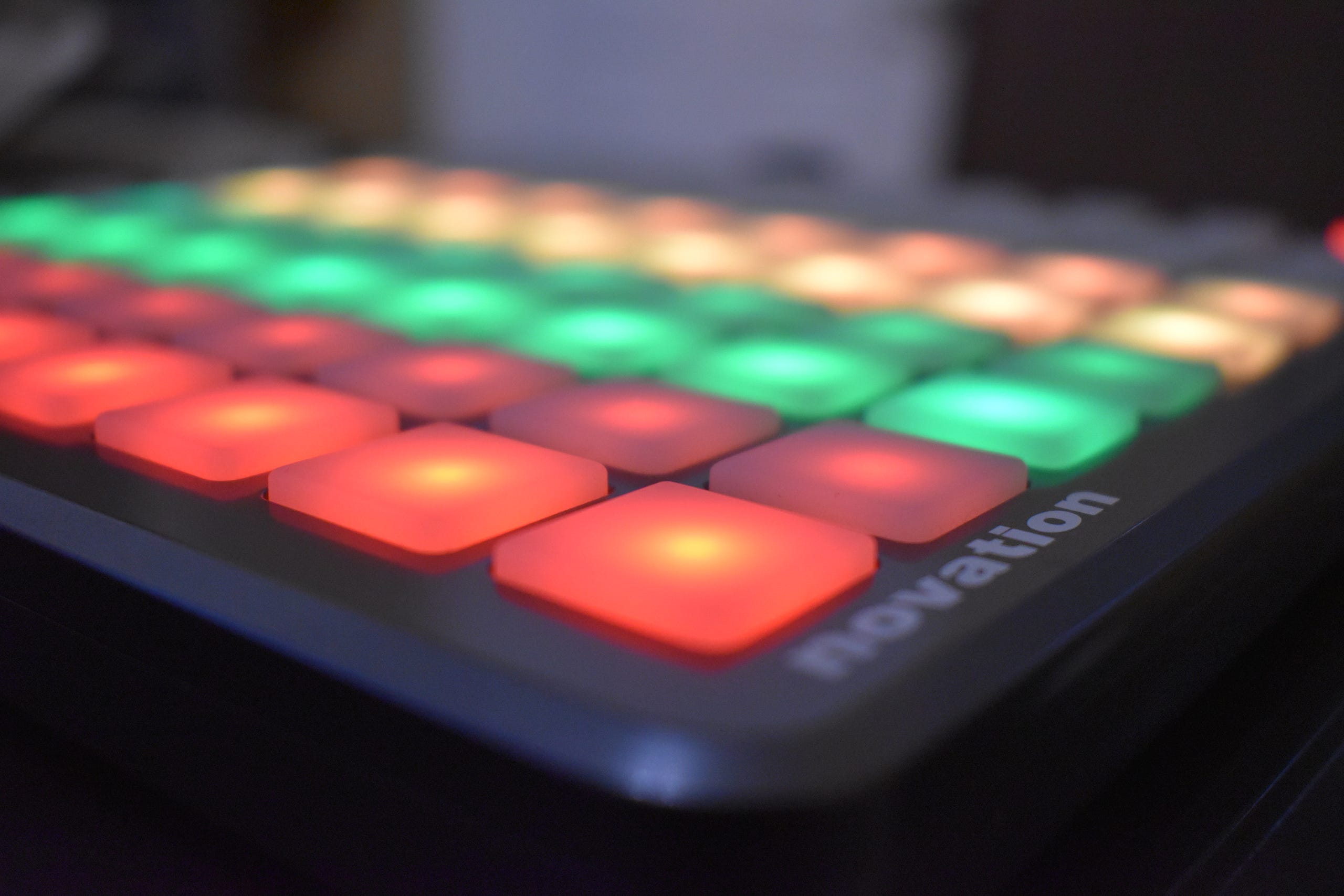
As I am setting up my new podcast Buddy Check, I want to really focus on my workflow and ensure that I could do as much live work as possible while interviewing, so that my show process is smooth and repeatable. I have a background in radio, and we always had access to a soundboard for live broadcasts.
What is a Soundboard?
The soundboard is a device that queues up advertisements, rolls, sound effects, sound bites from other sources, anything that you might find useful for live radio. By having these sounds at your fingertips, with a low latency player, we can quickly play sounds at just the right time in our recordings. This limits the amount of post-production work that has to be done.
Because our podcast is starting on a very limited budget, I am using tools that I already have available to me to get started. One of those tools is a used Novation Launchpad S. The Launchpad is traditionally a MIDI instrument. You load various sounds to it, press buttons on it, and make music. So it seems tailor made to do what I want.
There are a few quirks that you will have to get used to. They originally built the device to inter-operate with Ableton software. If you were planning to use Ableton as your Digital Audio Workstation, it could work out of the box. Unfortunately, Ableton does not work for my podcast workflow, so I needed an alternative.
I selected the following tools to add to my workflow and allow me to accomplish my goals. The links below are directly to the owners of the products. I do not have any affiliation with the companies, and I am not receiving compensation from these companies for this writing.
Soundplant
The first tool you need is the sound player itself. You need a low latency software, and you need to put it in the background, so it doesn’t interfere with the other software running on the DAW.
The best option I could find is Soundplant. This tool checks all of the check boxes that I had. It is a low latency sample trigger. It works in the background. The best feature is that it has an option for triggering with a combination of the control key, the alt key, and a letter. Then it has additional functionality if you also throw in the shift key. Because my DAW does not use combinations of Control and Alt together I can safely run the program in the background and not trigger any accidental key presses in my DAW.
Now just imagine if you had to hold down ctrl+alt+some letter several times during a podcast. That is not an easy task. Next, try memorizing 20+ audio file locations and their letter hotkey. These are difficult tasks, and I certainly want to avoid that difficulty. We can avoid it by using a macro tool on the Novation.
LPHK
In order to map the Novation to keyboard keys, so that it can trigger sound effects from my sound player, we needed a tool that could address and program the launchpad.
Thankfully, there is an open source tool named Launch Pad Hot Key that will map each key to a keyboard shortcut and allow you to define colors for each button. The tool has a rich scripting environment that allows you to send combinations of keys.
This tool is available here. There is now a windows installer that will complete the install of all of the necessary libraries and give you a desktop shortcut. The installer is in beta at the time of this writing, but it successfully installed on my Windows 10 DAW.
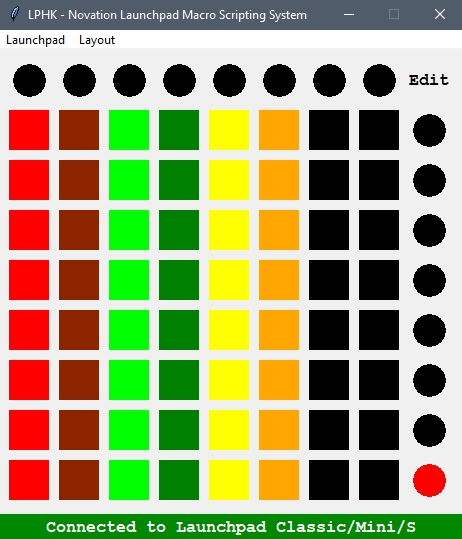
After installing, and playing with the scripting language, I determined that I could trigger any sound from Soundplant in the background, with a script.
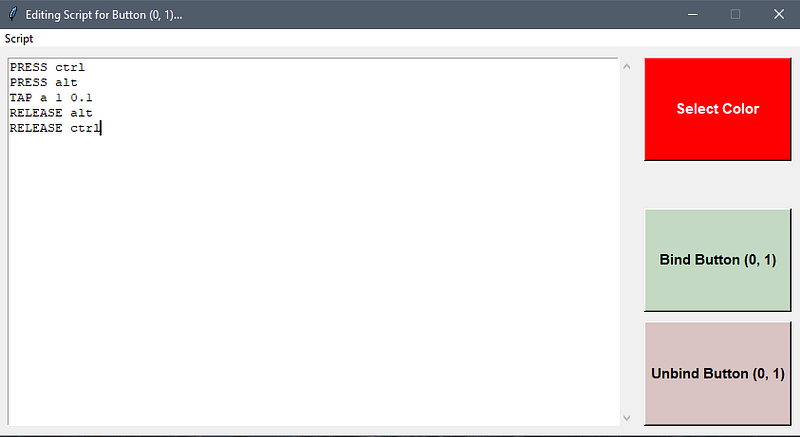
The above script will press “CTRL+ALT+a” and trigger the sound mapped to the “a” key in Soundplant. By modifying the script slightly, I can trigger a second option, which will fade out the sound bite that is currently playing. I place that on the key right next to the key that triggers my “a” and give it a darker color, so that it is intuitive.
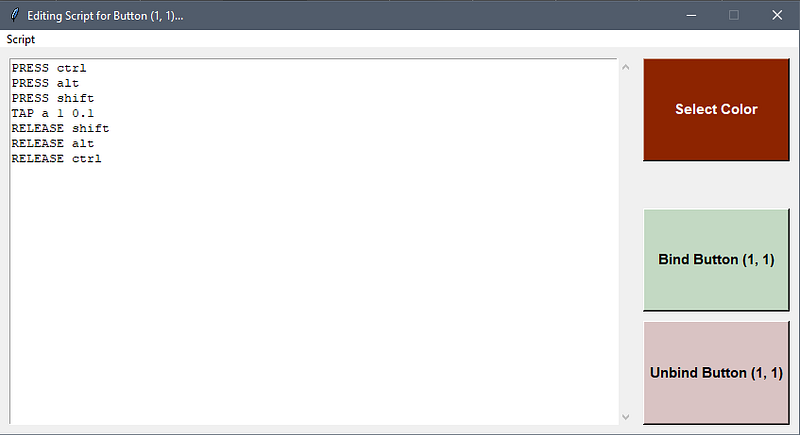
Notice that I simply added the shift key press and release functions to the script, and changed the color. On Soundplant I set the keypress to “Kill” and Shift+Keypress to “Fade”. This means that if I hit the key once, it plays. Twice, it kills the sound. If I press the key to the right of the primary key, it will begin fading the sound.
Color
The color pallets on the Novation S are extremely limited. Basically Reds, Greens, and Yellows in high and low power. I used high power of each of those to map letters A-X, and low power for each to map shift+A-X. Lastly I programmed an “All stop” key on the lower right circular key, just as a protection from an accidental trigger. If you have a newer Novation, you will have a much broader color pallet to play with.
Setup
Now I have three rows of 8 that I can assign. The first row I keep for rolls and talk overs. I assigned preroll to the first key, midroll out goes second, midroll in is third. The next four are for talk over music, and the last is for my outroll. This is a very natural progression for my podcast, and they will be the most used buttons.
The Green row is for advertisements and asks. I keep a few permanent ones and leave the rest for the day of.
The final row contains a few recurring sound effects and I reserve the last four to place sound bites. If I needed more, I could program the last two rows, and split this into 8 sound effects and 8 bites. Plenty of room to grow.
Mixing
I have a USB sound card that provides an additional sound card interface. Soundplant allows you to select the outbound interface for your audio. I use this to feed a stereo channel on my mixer. With the appropriate interface setup, this channel can be recorded independently, or if you are using a basic mixer, the audio will be included in your stereo mix.
Success
The pad is compact, taking up very little room on my mixing desk. It has big, well lit keys. My sounds are in an easily remembered order. Lastly, the whole setup just works very well for my needs.
The workflow allows me to record my whole podcast in real time, and go straight to post production, where I just apply my audio cleanups, and filters, then set the whole thing out into the wild.
Alternatives
There are alternative ways to fill this need. There are several tablet based options that will perform a similar function. You can purchase a tablet, an app, and appropriate cabling for your audio interface and accomplish the same task. I personally prefer a workflow based on physical buttons and sliders, and my equipment choices represent that aesthetic.
What options do you use for your soundboard?
If you want to learn more about the terms used in this article, see my article on Podcasting language:
The Language of Podcasting
_Learn how to speak like a podcaster, or at least how to understand one._medium.com